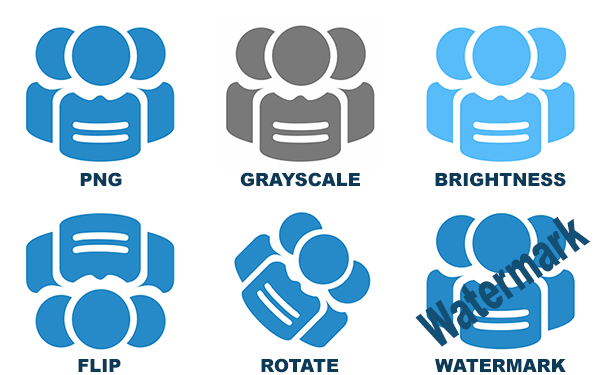
عند التعامل مع صور الويب، يُعد تنسيق PNG خيارًا شائعًا لدعمه للشفافية وتوافقه الواسع. من ناحية أخرى، يُفضَّل تنسيق SVG لتقابله القابل للتوسع، مما يجعله مثاليًا للشعارات والرموز والرسومات المتجهية الأخرى. على الرغم من مزايا SVG العديدة، قد تحتاج أحيانًا إلى تحويل ملفات SVG إلى PNG، خاصة لضمان التوافق عبر مختلف المنصات والأجهزة. في هذه المقالة، سنرشدك إلى عملية تحويل رسومات SVG إلى تنسيق PNG باستخدام Node.js.
واجهة برمجة تطبيقات Node.js لتحويل الصور
توفر GroupDocs واجهة برمجة تطبيقات Conversion API قوية تمكّن المطورين من تحويل صيغ الصور ومعالجة الصور الناتجة أثناء عملية التحويل. تدعم الواجهة مجموعة واسعة من الخيارات المتقدمة، مما يجعلها اختيارًا ممتازًا لتحويل SVG إلى PNG في Node.js. سنستخدم GroupDocs.Conversion for Node.js لهذا الغرض.
للبدء، يمكنك تثبيت GroupDocs.Conversion for Node.js عن طريق تشغيل الأمر التالي في مشروعك:
npm i @groupdocs/groupdocs.conversion
لمزيد من التفاصيل، زر الوثائق ومرجع API.
تحويل صورة SVG إلى PNG باستخدام Node.js
لنبدأ بتحويل رسومات SVG المتجهية إلى تنسيق PNG باستخدام الإعدادات الافتراضية. توضح الخطوات التالية كيفية تحويل صورة SVG إلى PNG باستخدام Node.js.
- تحميل ملف SVG باستخدام فئة Converter.
- إعداد خيارات التحويل.
- تحديد صيغة الإخراج كـ PNG.
- استدعاء طريقة convert() مع الخيارات المُعدّة.
إليك كود Node.js الذي يحول SVG إلى PNG:
تحويل متقدم من SVG إلى PNG باستخدام Node.js
يقدم GroupDocs.Conversion for Node.js مجموعة متنوعة من خيارات التخصيص التي يمكنك تطبيقها على مخرجات PNG أثناء عملية التحويل. تشمل هذه الخيارات:
- تعديل السطوع
- تعديل التباين
- تصحيح جاما
- تحويل إلى تدرج الرمادي
- انعكاس أفقي أو عمودي
- زوايا الدوران
- أبعاد صورة مخصصة (الارتفاع والعرض)
- إضافة علامة مائية
دعنا نلقي نظرة على كيفية تطبيق هذه الخيارات المتقدمة أثناء تحويل SVG إلى PNG في Node.js.
- تحميل ملف SVG باستخدام فئة Converter.
- إعداد خيارات التحويل للصورة.
- تحديد صيغة الإخراج كـ PNG.
- تعريف التخصيصات، مثل السطوع أو الدوران أو أي خيار آخر متاح.
- استدعاء طريقة convert() لإنشاء ملف PNG.
إليك كود Node.js الذي يطبق بعض هذه الخيارات المتقدمة:
جرّب تحويل SVG إلى PNG عبر الإنترنت مجانًا
هل تحتاج إلى حل سريع وسهل لتحويل ملفات SVG إلى PNG؟ استخدم هذا محول SVG إلى PNG عبر الإنترنت المجاني. يمكن الوصول إليه من أي جهاز يحتوي على متصفح ويب، مما يجعله مريحًا وخاليًا من المتاعب.
احصل على ترخيص API مجاني
يمكنك الحصول على ترخيص مؤقت مجاني لـ GroupDocs.Conversion، مما يتيح لك استخدام الواجهة دون قيود التقييم.
الخلاصة
في هذه المقالة، استعرضنا كيفية تحويل رسومات SVG المتجهية إلى صور PNG باستخدام Node.js مع GroupDocs.Conversion for Node.js. كما أظهرنا كيف يمكنك تحسين عملية التحويل عبر تطبيق تخصيصات مثل الدوران، تدرج الرمادي، العلامة المائية، تعديل السطوع، والمزيد. تتيح لك هذه الميزات المتقدمة تخصيص مخرجات PNG وفقًا لمتطلباتك الدقيقة.
للمزيد من الأمثلة، تفقد مستودع GroupDocs على GitHub، حيث يمكنك العثور على عينات كود متنوعة تساعدك في بناء محول SVG إلى PNG الخاص بك. إذا كان لديك أي أسئلة، لا تتردد في التواصل معنا عبر المنتدى.